
 English
 العربية

PROSOFT PLX32-EIP-MBTC
1. Product Overview
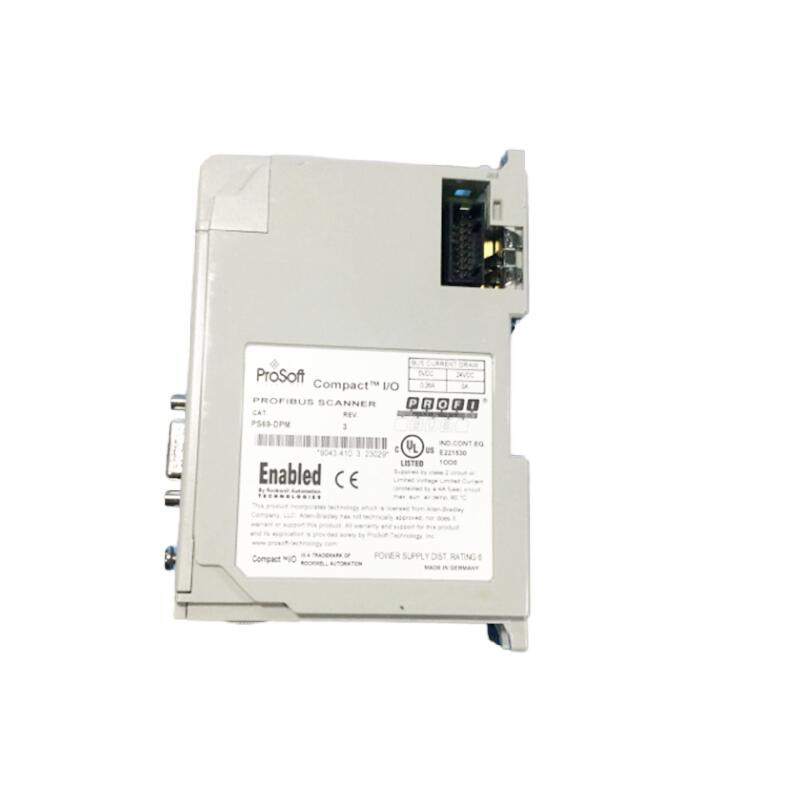
The PLX32-EIP-MBTCP is a hardware communication gateway designed to solve the “language barrier” between automation equipment from different manufacturers. It enables seamless connection between Schneider’s Modbus TCP/IP devices (such as inverters and sensors) and Rockwell’s EtherNet/IP devices (such as ControlLogix and CompactLogix), realizing real-time data interaction.
Core Function: Supports bidirectional communication between two mainstream industrial protocols without changing the IP address of on-site equipment.
Application Scenarios: Suitable for projects that need to connect Schneider PLCs or inverters to Rockwell control systems.
2. Parameters and Technical Specifications
Communication Ports
- EtherNet/IP Port: 1 independent Ethernet port (for connecting Rockwell devices).
- Modbus TCP/IP Port: 1 independent Ethernet port (for connecting Schneider devices).
- RS-232/RS-485: Some models (such as PLX31) may be equipped with ports for serial device connection.
Register Support
Supports large-scale data exchange and can access up to 4000 – 10,000 16-bit registers (depending on the firmware version).
Power Requirements
24V DC power supply, complying with the standard electrical specifications of industrial on-site.
Dimensions and Installation
Dimensions are approximately 114×99×40mm. It adopts a modular design and is suitable for standard DIN rail or cabinet installation.
3. Product Features
- Dual Subnet Function: The gateway has two completely independent built-in Ethernet ports, allowing EtherNet/IP and Modbus TCP/IP devices to operate in different subnets without interfering with each other.
- Data Priority Management: Supports data priority function. Users can set the transmission priority of key data to ensure that data with high real-time requirements (such as safety switch status) is guaranteed.
- Embedded EDS File: Built-in EDS (Electronic Data Sheet) file for EtherNet/IP, simplifying the device identification and configuration process in the Rockwell Studio 5000 environment.
- High Security: Some models support Security Layer, which can handle the transmission of security data.
4. Installation and Maintenance
Installation
- Physical Installation: Adopts standard industrial modular structure, supports DIN rail fixation or cabinet wall mounting, and is easy to install.
- Electrical Connection: Connect 24V DC power supply to ensure correct polarity and voltage range.
- Network Connection: Use standard Cat5e or Cat6 Ethernet cables to connect to on-site Ethernet switches or directly connect to devices.
Configuration
- PC Software Configuration: Use ProSoft’s PC configuration tool (such as ProSoft Configuration Utility) to set the communication mapping table (that is, “which register is mapped to which address”) on the PC.
- PLC Configuration: Add the gateway device in Rockwell’s Studio 5000 environment and import the EDS file to identify its data structure.
Maintenance
- Firmware Upgrade: Supports remote firmware upgrade via Ethernet to improve communication performance or fix known issues.
- Diagnostic Function: Read the gateway’s status registers through the PLC program, or observe the fault indicator lights on the gateway to quickly locate communication errors (such as IP conflicts and network disconnections).
————————————————————————————————-
Main brand
ABB Allen-Bradley Alstom Bently Emerson Foxboro
GE MOOG Schneider Woodward HIMA Honeywel Triconex & more
Contact our professional team today for customized solutions to meet your electrical component needs.
📧 x13806028623@gmail.com / johnedward.zch@gmail.com
📞 +86 18250705533(Whatsapp)丨Sales Manager : Jinny/John

-480x480.jpg)
-480x480.jpg)

There are no reviews yet.