
 English
 العربية

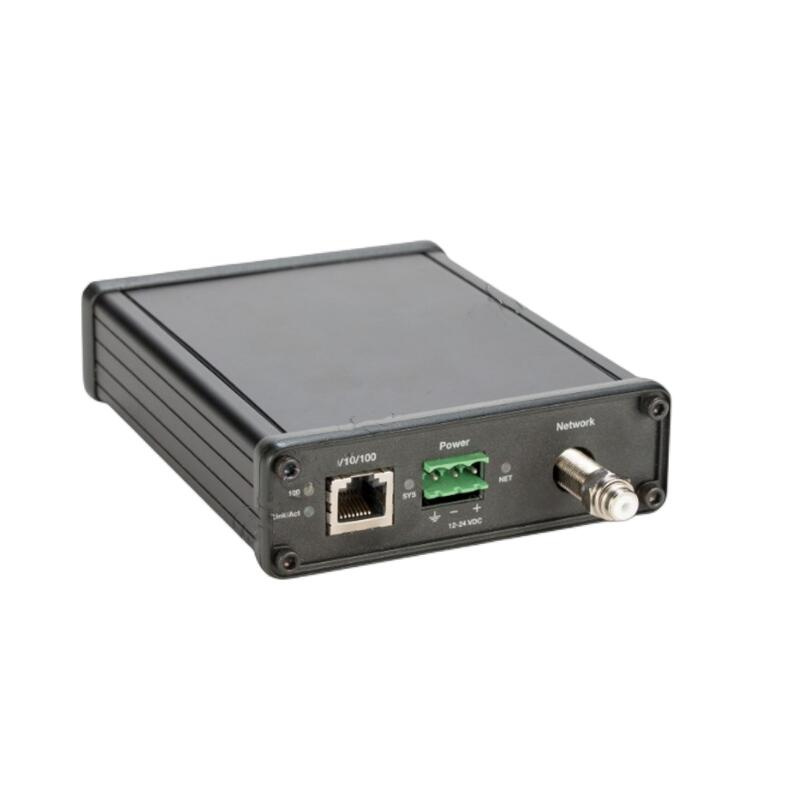
PROSOFT MVI69-MNET
1. Overview
The MVI69-MNET is a member of the ProSoft MVI69 series modules, specifically designed to enable high-speed communication between Rockwell Automation controllers and Modbus TCP/IP devices. It connects to the ControlLogix processor via an Ethernet interface and exchanges data with external devices (such as frequency converters, sensors, and smart meters) through the Modbus protocol.
2. Core Specifications
|
Parameter
|
Specification
|
|---|---|
|
Model
|
MVI69-MNET
|
|
Supported Protocols
|
Modbus TCP (Master/Slave Mode), Modbus RTU (RTU over TCP/IP)
|
|
Connection Type
|
Ethernet
|
|
Compatible Platforms
|
Rockwell Automation CompactLogix 5000 Series (e.g., 1756-L61, L71, L81, etc.)
|
|
Communication Speed
|
Supports 10/100 Mbps Ethernet
|
|
Power Requirement
|
24V DC (Powered via PLC Chassis)
|
|
Dimensions
|
Single Slot (1U) Module
|
3. Product Features
- Seamless Integration: No additional gateway hardware is required. Directly insert into the ControlLogix chassis to interact with instructions (e.g., MSG instructions) in the PLC program (Ladder Logic).
- Flexible Configuration: Supports configuration via ProSoft Configurator software, including setting Modbus TCP Server or Client parameters.
- High Compatibility: Capable of communicating with various Modbus devices (e.g., frequency converters and meters from brands like ABB, Siemens, Schneider, etc.).
- Diagnostic Function: The module is equipped with built-in LED indicators, facilitating real-time monitoring of network status and troubleshooting.
4. Structure and Composition
- PCIe Slot Interface: Directly connects to the PCIe expansion slot of the CompactLogix processor.
- RJ45 Port: Used for connecting to an Ethernet switch or directly to Modbus devices.
- Configuration Software: Works with ProSoft Configurator, enabling network parameter settings without the need for complex coding.
5. Application Areas
- Variable Frequency Drive Communication: Integrate frequency converters (e.g., SEW, SIEMENS) into the SCADA system to achieve remote monitoring and control.
- Energy Management: Read data from smart meters for energy consumption analysis.
- Smart Manufacturing: Connect various smart sensors (e.g., temperature and pressure sensors) to realize data collection.
- Building Automation: Integrate with Building Management Systems (BMS) to control HVAC, lighting, and other equipment.
6. Installation and Maintenance
- Installation: After turning off the power, insert the MVI69-MNET into the PCIe expansion slot of the CompactLogix chassis and secure it with screws.
- Connection: Use a network cable to connect the RJ45 port of the module to an Ethernet switch or directly to Modbus devices.
- Configuration: Run ProSoft Configurator on the PC to set parameters such as IP address and communication mode (TCP Server/Client).
- Debugging: Use MSG instructions in the PLC program to read/write data from/to Modbus devices and monitor communication status.
————————————————————————————————-
Main brand
ABB Allen-Bradley Alstom Bently Emerson Foxboro
GE MOOG Schneider Woodward HIMA Honeywel Triconex & more
Contact our professional team today for customized solutions to meet your electrical component needs.
📧 x13806028623@gmail.com / johnedward.zch@gmail.com
📞 +86 18250705533(Whatsapp)丨Sales Manager : Jinny/John

-480x480.jpg)
-480x480.jpg)

There are no reviews yet.