Call us 24/7+7 926 688 9996
Welcome to the official website of Xiamen xingruijia import and export co,ltd.
Email: johnedward.zch@gmail.com Whatsapp/Mobile:+7 926 688 9996
[gt-link lang="en" label="English" widget_look="flags_name"] [gt-link lang="ar" label="ar" widget_look="flags_name"]

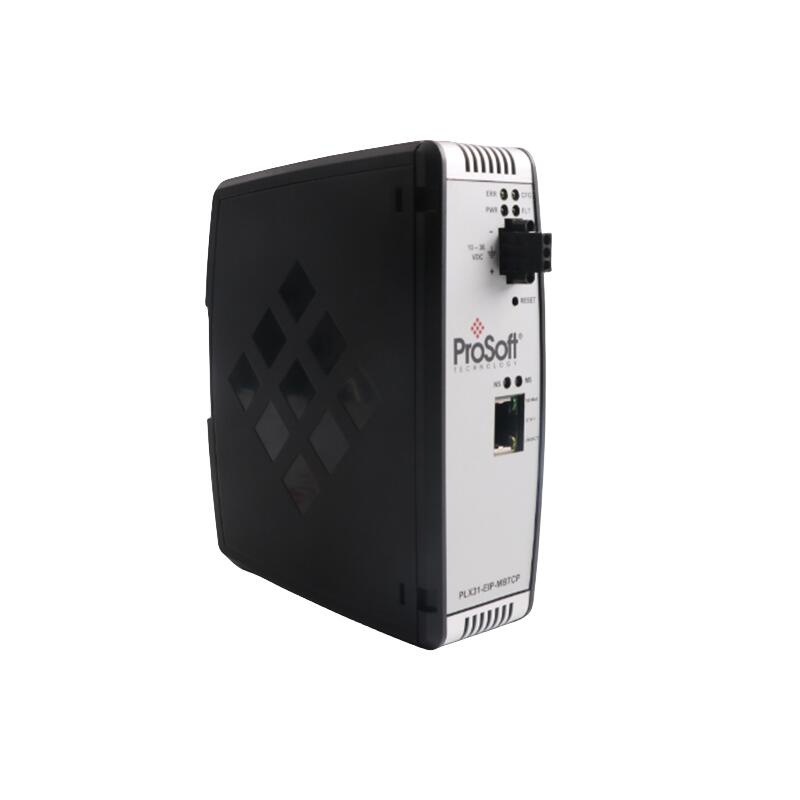
PROSOFT MVI46-PDPMV1 Master Module

The PROSOFT MVI46-PDPMV1 is a PROFIBUS DP-V1 Master module designed to enable high-speed data transfer between Rockwell SLC processors (such as the SLC 500 series) and PROFIBUS DP networks using proprietary backplane technology.

PROSOFT MVI46-PDPMV1

1. Overview

The PROSOFT MVI46-PDPMV1 is a PROFIBUS DP-V1 Master module designed to enable high-speed data transfer between Rockwell SLC processors (such as the SLC 500 series) and PROFIBUS DP networks using proprietary backplane technology. The module supports Class 1 and Class 2 DP-V1 services for acyclic parameter data, allowing the SLC processor to directly access I/O data from devices on the PROFIBUS network.

2. Key Specifications

  • Communication Protocol: PROFIBUS DP-V1 (compliant with IEC 61158)
  • Host Compatibility: Designed for SLC processors (e.g., SLC 500 series)
  • Backplane Compatibility: 1746 backplane
  • Network Type: PROFIBUS DP 1.0 (primarily used for remote I/O systems)
  • Maximum Baud Rate: 12 Mbps (supports high‑speed data transfer)
  • Memory: On‑board database for data exchange and mailbox communication
  • Operating Environment: Industrial-grade, supporting temperatures from -40°C to +85°C

3. Product Features

 Proprietary Backplane Technology: Enables high-speed, direct communication between the SLC host and the PROFIBUS network, delivering higher efficiency than traditional gateways.
  • Master-Only Operation: Functions exclusively as a PROFIBUS Master and does not support Slave mode.
  • Ladder Logic Access: Allows direct reading and writing of PROFIBUS I/O data within the SLC processor’s ladder logic.
  • Asynchronous Data Transfer: Supports asynchronous communication between the SLC processor and PROFIBUS devices.
  • Write Protect Function: Prevents accidental firmware overwrites by disabling flash memory writes by default. This feature can be configured via jumpers to enable firmware updates in remote racks.
  • Diagnostic Capabilities: Provides online diagnostics, CRC checking, and front-panel status LEDs for easy troubleshooting.
4. Structure and Components

  • Module Main Body: Installs in an SLC processor slot and includes the backplane interface.
  • Jumpers: Located on the rear of the module for configuring write‑protect mode and network parameters such as station address and baud rate.
  • Front-Panel LEDs: Typically include power and communication status indicators to show module operation.
  • Internal Database: Caches network data and manages mailbox communication.

5. Installation and Maintenance

Installation Steps

  1. Preparation: Ensure the SLC processor and PROFIBUS devices are ready, and back up the system configuration.
  2. Hardware Installation: Insert the MVI46-PDPMV1 into an available slot on the SLC backplane and secure it properly.
  3. Jumper Configuration: Set the rear jumpers according to the network parameters (station address, baud rate, etc.).
  4. Software Configuration: Use ProSoft’s Configuration Builder tool on a PC to configure the module and download the settings to the SLC processor.
  5. Wiring: Connect PROFIBUS devices (such as I/O modules and frequency converters) using standard PROFIBUS cabling.

Maintenance Notes

  • Write Protection: It is recommended to keep the write‑protect jumper enabled during normal operation to prevent accidental firmware changes.
  • Remote Updates: If firmware updates are required in a remote rack, follow the manual instructions to disable write protection temporarily.
  • Diagnostics: Monitor communication status through the front‑panel LEDs and diagnostic tools in the SLC software to address issues promptly.

————————————————————————————————-

Main brand

ABB   Allen-Bradley   Alstom   Bently      Emerson   Foxboro

GE   MOOG   Schneider   Woodward   HIMA   Honeywel   Triconex    & more

Contact our professional team today for customized solutions to meet your electrical component needs.

📧 x13806028623@gmail.com / johnedward.zch@gmail.com

 📞 +86 18250705533(Whatsapp)Sales Manager : Jinny/John

———————————————————————-
For more ABB products, please click here

1.Our company is an offline entity and can issue 13% VAT invoices.

2.Customers requiring invoices must request them explicitly. Product prices listed are exclusive of tax.

3.Shipping methods: SF Express, Deppon, EMS. If other couriers are needed, please contact us before purchase.

4.Please inspect the package upon delivery before signing. No returns or exchanges will be accepted for damages discovered after signing without inspection.

5.If you find the same product offered at a lower price by another supplier, we are willing to match the price and offer further discounts.

6.All products are in stock and ready for immediate shipment. Accessories come with a 3–6 month warranty, while new original products have a 1-year warranty.

7.Receiving goods: Upon delivery, please confirm the outer packaging is intact before signing. If shortages or missing items are found during inspection, you may refuse delivery and contact us promptly.

8.Due to the wide variety of models, not all are listed. If you can’t find the model you need, feel free to contact us via email or phone.

Warranty Terms:

  • Warranty Period: Most products come with a limited warranty, typically 1 year or longer, depending on the product type.
  • Coverage: Warranty covers defects in materials or workmanship. Repairs or replacements are free for faults under normal use.
  • Exclusions:
  • Damage caused by mishandling (e.g., drops, water exposure, or misuse).
  • Unauthorized repairs or modifications.
  • Failures occurring after the warranty period expires.
  • Process: To claim warranty service, provide proof of purchase (e.g., invoice) and contact customer service. Return the product to the designated repair center as instructed.
  • Fees: Repairs within warranty are free, but out-of-coverage services may incur charges.


    Customers reviews

    There are no reviews yet.

    Be the first to review “PROSOFT MVI46-PDPMV1 Master Module”

    Your email address will not be published. Required fields are marked *

    PROSOFT MVI46-PDPMV1 Master Module

    instock
    The PROSOFT MVI46-PDPMV1 is a PROFIBUS DP-V1 Master module designed to enable high-speed data transfer between Rockwell SLC processors (such as the SLC 500 series) and PROFIBUS DP networks using proprietary backplane technology.

    PROSOFT MVI46-PDPMV1

    1. Overview

    The PROSOFT MVI46-PDPMV1 is a PROFIBUS DP-V1 Master module designed to enable high-speed data transfer between Rockwell SLC processors (such as the SLC 500 series) and PROFIBUS DP networks using proprietary backplane technology. The module supports Class 1 and Class 2 DP-V1 services for acyclic parameter data, allowing the SLC processor to directly access I/O data from devices on the PROFIBUS network.

    2. Key Specifications

    • Communication Protocol: PROFIBUS DP-V1 (compliant with IEC 61158)
    • Host Compatibility: Designed for SLC processors (e.g., SLC 500 series)
    • Backplane Compatibility: 1746 backplane
    • Network Type: PROFIBUS DP 1.0 (primarily used for remote I/O systems)
    • Maximum Baud Rate: 12 Mbps (supports high‑speed data transfer)
    • Memory: On‑board database for data exchange and mailbox communication
    • Operating Environment: Industrial-grade, supporting temperatures from -40°C to +85°C

    3. Product Features

     Proprietary Backplane Technology: Enables high-speed, direct communication between the SLC host and the PROFIBUS network, delivering higher efficiency than traditional gateways.
    • Master-Only Operation: Functions exclusively as a PROFIBUS Master and does not support Slave mode.
    • Ladder Logic Access: Allows direct reading and writing of PROFIBUS I/O data within the SLC processor’s ladder logic.
    • Asynchronous Data Transfer: Supports asynchronous communication between the SLC processor and PROFIBUS devices.
    • Write Protect Function: Prevents accidental firmware overwrites by disabling flash memory writes by default. This feature can be configured via jumpers to enable firmware updates in remote racks.
    • Diagnostic Capabilities: Provides online diagnostics, CRC checking, and front-panel status LEDs for easy troubleshooting.

    4. Structure and Components

    • Module Main Body: Installs in an SLC processor slot and includes the backplane interface.
    • Jumpers: Located on the rear of the module for configuring write‑protect mode and network parameters such as station address and baud rate.
    • Front-Panel LEDs: Typically include power and communication status indicators to show module operation.
    • Internal Database: Caches network data and manages mailbox communication.

    5. Installation and Maintenance

    Installation Steps

    1. Preparation: Ensure the SLC processor and PROFIBUS devices are ready, and back up the system configuration.
    2. Hardware Installation: Insert the MVI46-PDPMV1 into an available slot on the SLC backplane and secure it properly.
    3. Jumper Configuration: Set the rear jumpers according to the network parameters (station address, baud rate, etc.).
    4. Software Configuration: Use ProSoft’s Configuration Builder tool on a PC to configure the module and download the settings to the SLC processor.
    5. Wiring: Connect PROFIBUS devices (such as I/O modules and frequency converters) using standard PROFIBUS cabling.

    Maintenance Notes

    • Write Protection: It is recommended to keep the write‑protect jumper enabled during normal operation to prevent accidental firmware changes.
    • Remote Updates: If firmware updates are required in a remote rack, follow the manual instructions to disable write protection temporarily.
    • Diagnostics: Monitor communication status through the front‑panel LEDs and diagnostic tools in the SLC software to address issues promptly.

    ————————————————————————————————-

    Main brand

    ABB   Allen-Bradley   Alstom   Bently      Emerson   Foxboro

    GE   MOOG   Schneider   Woodward   HIMA   Honeywel   Triconex    & more

    Contact our professional team today for customized solutions to meet your electrical component needs.

    📧 x13806028623@gmail.com / johnedward.zch@gmail.com

     📞 +86 18250705533(Whatsapp)Sales Manager : Jinny/John

    ———————————————————————-
    For more ABB products, please click here

    1.Our company is an offline entity and can issue 13% VAT invoices.

    2.Customers requiring invoices must request them explicitly. Product prices listed are exclusive of tax.

    3.Shipping methods: SF Express, Deppon, EMS. If other couriers are needed, please contact us before purchase.

    4.Please inspect the package upon delivery before signing. No returns or exchanges will be accepted for damages discovered after signing without inspection.

    5.If you find the same product offered at a lower price by another supplier, we are willing to match the price and offer further discounts.

    6.All products are in stock and ready for immediate shipment. Accessories come with a 3–6 month warranty, while new original products have a 1-year warranty.

    7.Receiving goods: Upon delivery, please confirm the outer packaging is intact before signing. If shortages or missing items are found during inspection, you may refuse delivery and contact us promptly.

    8.Due to the wide variety of models, not all are listed. If you can’t find the model you need, feel free to contact us via email or phone.

    Warranty Terms:

    • Warranty Period: Most products come with a limited warranty, typically 1 year or longer, depending on the product type.
    • Coverage: Warranty covers defects in materials or workmanship. Repairs or replacements are free for faults under normal use.
    • Exclusions:
    • Damage caused by mishandling (e.g., drops, water exposure, or misuse).
    • Unauthorized repairs or modifications.
    • Failures occurring after the warranty period expires.
    • Process: To claim warranty service, provide proof of purchase (e.g., invoice) and contact customer service. Return the product to the designated repair center as instructed.
    • Fees: Repairs within warranty are free, but out-of-coverage services may incur charges.


      Customers reviews

      There are no reviews yet.

      Be the first to review “PROSOFT MVI46-PDPMV1 Master Module”

      Your email address will not be published. Required fields are marked *

      Contact Us​

      Phone numbers:
      +7 926 688 9996

      E-mail:
      johnedward.zch@gmail.com

      whatsapp:
      +7 926 688 9996

      Best quality

      Best quality is a must at organic

      Shipping

      UPS, DHL, FedEx, TNT and DPD

      Support 24/7

      Contact us 24 hours a day

      Search for products

      Product has been added to your cart
      phone: +7 926 688 9996
      email: johnedward.zch@gmail.com