
 English
 العربية
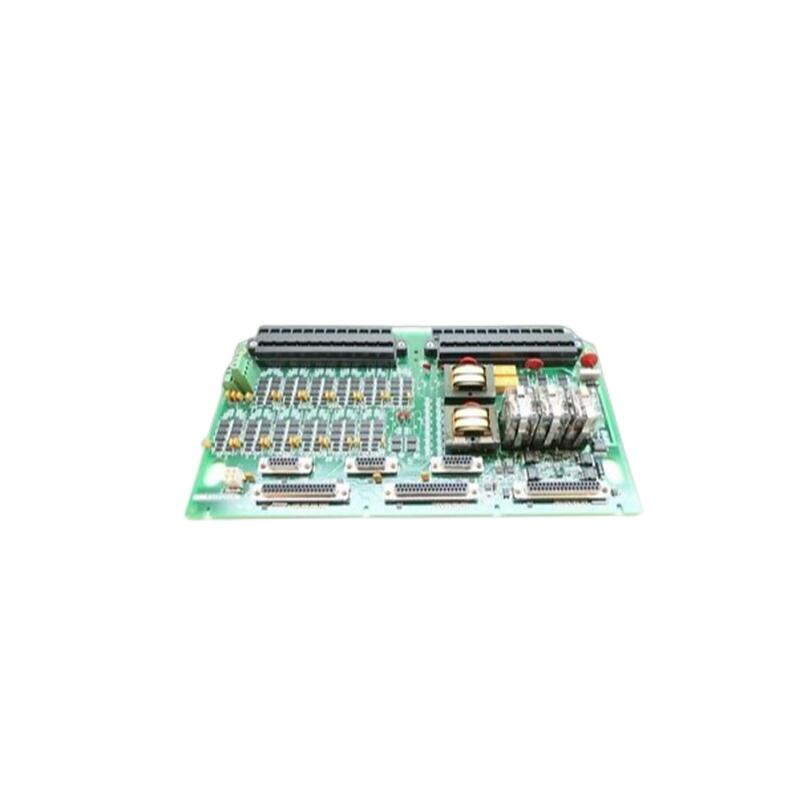

GE IC755CSS12CDB
I. Overview
The GE IC755CSS12CDB is a high-performance industrial controller widely used in industrial automation systems. It integrates multiple functions, including digital logic control, PID control, and PLC programming, making it suitable for industrial environments that require high precision and high reliability.
II. Parameters
- Processor: Intel Celeron J1900
- Memory: 4GB RAM
- Storage space: 64GB SSD
- Screen size: 12-inch color TFT display
- Resolution: 1024 x 768
- Power supply voltage: 24VDC
- Communication interfaces: 2 Ethernet ports, 2 USB ports, 1 RS232 interface
- Operating system: Supports Windows 10
- Programming languages: Supports multiple programming languages such as C/C++, Python, etc.
- Communication protocols: Supports communication protocols such as Modbus, OPC UA, etc.
- Operating temperature: -20°C to 60°C
- Dimensions: 180mm × 160mm × 60mm
- Weight: 1.5 kg
III. Product Features
- High performance: Equipped with the Intel Celeron J1900 processor, providing powerful computing capabilities.
- Versatility: Supports multiple programming languages and communication protocols, suitable for various industrial automation scenarios.
- Easy integration: With standard interfaces and communication protocols, it can be easily integrated with other GE modules, PLCs, or other industrial automation equipment.
- Flexibility: Supports multiple configuration options and functions, which can be customized according to specific application requirements.
- Easy maintenance and debugging: It offers rich diagnostic functions and fault indicators, facilitating users in troubleshooting and maintenance. Meanwhile, it is usually used together with the programming software provided by GE, enabling convenient configuration, monitoring, and debugging.
- Rugged and reliable: Adopts high-quality materials and advanced manufacturing processes to ensure stable operation in various industrial environments.
- Long lifespan: Designed with a long service life, suitable for industrial environments that require long-term continuous operation.

IV. Structure and Composition
The GE IC755CSS12CDB consists of multiple modules, including:
- Main control module: Responsible for core control functions, including processor, memory, and storage space.
- Input/output module: Provides multiple input/output interfaces, supporting the connection of various sensors and actuators.
- Communication module: Provides Ethernet, USB, RS232, and other communication interfaces, supporting multiple communication protocols.
- Power module: Provides stable 24VDC power supply to ensure the normal operation of the equipment.
- Display module: 12-inch color TFT display, supporting multi-touch projected capacitive screen for easy operation and monitoring.
V. Application Fields
The GE IC755CSS12CDB is widely used in the following fields:
- Manufacturing industry: Used for automated control of production lines to improve production efficiency and product quality.
- Energy industry: Used for automated control of energy facilities such as power plants and substations.
- Transportation industry: Used for automated control of public transportation systems such as subways and buses.
- Other industrial fields: Used in industrial automation systems that require high precision and high reliability.
VI. Installation and Maintenance
Installation Steps:
- Preparation: Ensure that the installation environment meets the technical requirements of the equipment, including power supply, network, and physical space.
- Install the main control module: Install the main control module in the designated position, ensuring it is firmly fixed.
- Connect input/output modules: Connect various input/output modules as needed, ensuring correct connections.
- Connect communication modules: Connect Ethernet, USB, RS232, and other communication interfaces to ensure normal communication.
- Connect the power module: Connect the 24VDC power supply to ensure stable power supply.
- Connect the display module: Install the 12-inch color TFT display to ensure clear display.
Debugging Steps:
- Initial configuration: Use programming software for initial configuration to ensure the equipment operates normally.
- Operation test: Conduct operation tests to ensure all functions are normal.
- Troubleshooting: Use diagnostic functions for troubleshooting to ensure stable operation of the equipment.
Maintenance Steps:
- Regular inspection: Regularly check the operating status of the equipment to ensure it operates normally.
- Cleaning and maintenance: Regularly clean the surface of the equipment to prevent dust and dirt from affecting its performance.
- Software update: Regularly update the equipment’s software to ensure its performance and security.
- Data backup: Regularly back up the equipment’s data to prevent data loss.
————————————————————————————————-
Xiamen Xingruijia Import and Export Co., Ltd | Product Details
Main brand
ABB Allen-Bradley Alstom Bently Emerson Foxboro
GE MOOG Schneider Woodward HIMA Honeywel Triconex & more
Contact our professional team today for customized solutions to meet your electrical component needs.
📧 x13806028623@gmail.com / johnedward.zch@gmail.com
📞 +86 18250705533(Whatsapp)丨Sales Manager : Jinny/John


There are no reviews yet.